
Microsoft 365 vs Google Workspace: Which Is Right for Your San Antonio Business?
Microsoft 365 vs Google Workspace: Choosing the Best Cloud Productivity Solution for Your San Antonio Business

In the competitive landscape of cloud productivity solutions, businesses in San Antonio face a crucial decision: choosing between Microsoft 365 and Google Workspace. Both platforms offer robust features designed to enhance collaboration, productivity, and security. This article will delve into the key features, collaboration capabilities, security measures, and pricing structures of both services, helping you determine which solution aligns best with your business needs. As companies increasingly rely on digital tools, understanding the nuances of these platforms is essential for optimizing operations and ensuring data security. We will also explore the role of local IT services in facilitating a smooth transition to either platform, emphasizing the importance of expert support in the migration process.
Call Evolution Technologies today at (210) 775-1115
Understanding the various factors that influence cloud platform evaluation is crucial for making an informed decision.
Factors for Cloud Platform Selection & Evaluation In 2025, cloud platform selection has become increasingly complex due to the rapid evolution of technology and diverse business needs. Key factors now include scalability, integration capabilities, AI-driven analytics, security compliance, and user experience. Decision-makers must weigh these criteria carefully to select platforms that not only meet current requirements but also adapt to future challenges. Comprehensive evaluation frameworks incorporating real-time data and predictive insights are essential for making well-informed choices in this dynamic environment. Modern Cloud Platform Evaluation Frameworks, A. Chen & L. Patel, 2025
What Are the Key Features of Microsoft 365 and Google Workspace for San Antonio Businesses?

Microsoft 365 and Google Workspace each provide a suite of features tailored to enhance business productivity. Microsoft 365 is known for its comprehensive suite of applications, including Word, Excel, and PowerPoint, which are essential for document creation and data analysis. Additionally, it offers Microsoft Teams for communication and collaboration, allowing teams to work together seamlessly.
On the other hand, Google Workspace excels in real-time collaboration through tools like Google Docs, Sheets, and Slides, which allow multiple users to edit documents simultaneously. This feature is particularly beneficial for teams that require constant communication and updates. Both platforms also include cloud storage solutions—OneDrive for Microsoft 365 and Google Drive for Google Workspace—ensuring that files are accessible from anywhere.
Ultimately, the choice between these platforms will depend on your specific business needs and the tools your team is most comfortable using.
Schedule your free IT consultation: (210) 775-1115
To further optimize this selection process, businesses can benefit from comprehensive evaluation approaches that align cloud services with specific enterprise requirements.
Optimizing Cloud Service Selection for Business Needs As cloud services continue to evolve in 2025 and beyond, decision-making frameworks have advanced to incorporate artificial intelligence and real-time analytics for enhanced cloud service selection. Modern decision support systems integrate dynamic criteria weighting, predictive performance modeling, and adaptive learning to tailor cloud solutions precisely to enterprise needs. These innovations enable businesses to optimize cloud adoption strategies with greater accuracy and agility, ensuring alignment with evolving operational demands. Advances in Cloud Service Selection Using AI and Real-Time Analytics, J. Martinez et al., 2025
How Do Microsoft 365 and Google Workspace Support Cloud Collaboration and Productivity?
Both Microsoft 365 and Google Workspace are designed to enhance cloud collaboration and productivity, albeit through different approaches. Microsoft 365 integrates its applications with Microsoft Teams, providing a centralized hub for communication, file sharing, and project management. This integration allows users to schedule meetings, share files, and collaborate in real-time, significantly improving work flow efficiency.
Conversely, Google Workspace emphasizes real-time collaboration across its suite of applications. Users can work on documents, spreadsheets, and presentations simultaneously, with changes reflected instantly. This capability fosters a collaborative environment where feedback can be provided in real-time, making it ideal for teams that prioritize agility and responsiveness.
For businesses in San Antonio, leveraging these collaboration tools can lead to improved productivity and streamlined operations. Additionally, partnering with local IT service providers, such as Evolution Technologies, can enhance the implementation of these tools, ensuring that your team maximizes their potential.
Enhance your team's collaboration and productivity with expert IT support.
What Security Features Differentiate Microsoft 365 and Google Workspace?
Security is a paramount concern for businesses when selecting a cloud productivity solution. Microsoft 365 offers advanced security features, including multi-factor authentication, data loss prevention, and advanced threat protection. These features help safeguard sensitive information and ensure compliance with industry regulations.
Google Workspace also prioritizes security, providing features such as encryption for data at rest and in transit, as well as robust phishing protection. Both platforms undergo regular security audits and updates to address emerging threats, making them reliable choices for businesses concerned about data security.
To further enhance your business's defenses, consider exploring robust cybersecurity services that can provide comprehensive protection against evolving threats.
Get started with managed IT support: (210) 775-1115
Protect your business with expert cybersecurity and IT management.
How Do Pricing and Licensing Options Compare for Microsoft 365 and Google Workspace in Texas?
When evaluating Microsoft 365 and Google Workspace, pricing and licensing options are critical factors. Microsoft 365 offers various plans tailored to different business sizes and needs, starting from basic plans for small businesses to comprehensive enterprise solutions. This flexibility allows businesses to choose a plan that aligns with their budget and requirements.
Google Workspace also provides tiered pricing, with plans designed for small to large organizations. Each plan includes different features, such as storage limits and advanced administrative controls. For businesses in Texas, understanding these pricing structures is essential for budgeting and ensuring that the chosen solution meets their operational needs.
The evolution of cloud computing has also brought about diverse software licensing models, which are important to consider when evaluating costs and benefits.
Cloud Software Licensing Models & Benefits As cloud computing continues to evolve in 2025, software licensing models have adapted to offer greater flexibility and cost efficiency. Modern licensing approaches include subscription-based models, pay-as-you-go options, and hybrid licenses that combine on-premises and cloud usage. These models enable businesses to scale their software usage dynamically while optimizing expenses. Additionally, cloud providers increasingly support license mobility and bring-your-own-license (BYOL) programs, allowing organizations to leverage existing investments. Understanding these contemporary licensing frameworks is essential for maximizing the benefits of cloud software deployments.
Emerging Trends in Cloud Software Licensing, Tech Insights Journal, 2025
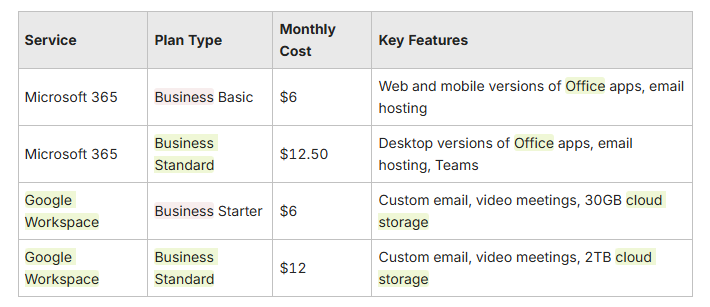
This comparison highlights the importance of evaluating both platforms' pricing and features to find the best fit for your business.
What Are the Microsoft 365 Business Plans Available in San Antonio?
Microsoft 365 offers several business plans tailored to meet the diverse needs of organizations in San Antonio. The Business Basic plan provides essential tools for collaboration and communication, including web and mobile versions of Office applications and email hosting. For businesses requiring more robust features, the Business Standard plan includes desktop versions of Office applications, along with Microsoft Teams for enhanced collaboration.
Additionally, Microsoft 365 offers enterprise plans that cater to larger organizations with advanced security and compliance needs. Understanding these options allows San Antonio businesses to select a plan that aligns with their operational requirements and budget.
How Does Google Workspace Pricing Vary for Texas Businesses?
Google Workspace pricing is structured to accommodate various business sizes and needs. The Business Starter plan offers essential features, including custom email and video meetings, making it suitable for small businesses. For organizations that require more storage and advanced features, the Business Standard plan provides additional benefits, such as increased cloud storage and enhanced administrative controls.
Texas businesses should consider their specific needs when selecting a Google Workspace plan, ensuring that they choose an option that supports their growth and operational efficiency.
What Are the Best Migration Strategies for Transitioning to Microsoft 365 or Google Workspace?

Transitioning to a new cloud productivity solution requires careful planning and execution. Effective migration strategies include conducting a pre-migration assessment to evaluate current IT infrastructure and identify potential challenges. Additionally, providing user training and support during the transition can help employees adapt to the new platform more quickly.
Post-migration support is also crucial to address any issues that may arise after the transition. By implementing these strategies, businesses can ensure a smooth migration process and minimize disruptions to their operations.
How Can San Antonio Businesses Ensure a Smooth Cloud Migration?
To ensure a smooth cloud migration, San Antonio businesses should follow several key steps. First, assessing the current IT infrastructure is essential to identify any compatibility issues with the new platform. Next, developing a detailed migration plan that outlines timelines, responsibilities, and resources can help streamline the process.
Ongoing communication with employees throughout the migration is vital to address concerns and provide necessary training. Finally, continuous monitoring post-migration can help identify and resolve any issues that may arise, ensuring that the new system operates effectively.
Ready to protect your San Antonio business? Call (210) 775-1115
What Role Do Local IT Services Play in Microsoft 365 and Google Workspace Migration?
Local IT services play a critical role in the migration process for Microsoft 365 and Google Workspace. These experts can conduct pre-migration assessments, ensuring that businesses are well-prepared for the transition. Additionally, they can assist with security configurations and user training, helping employees adapt to the new platform.
By partnering with local IT service providers, such as Evolution Technologies, businesses can leverage their expertise to navigate the complexities of cloud migration, ensuring a successful transition that minimizes disruptions. Learn more about our cloud migration services.
Why Should San Antonio Businesses Choose Local Managed IT Services for Microsoft 365 or Google Workspace?
Choosing local managed IT services for Microsoft 365 or Google Workspace offers several advantages for San Antonio businesses. Local providers understand the unique challenges and needs of the regional market, allowing them to tailor their services accordingly. Additionally, local support ensures that businesses can receive timely assistance when issues arise, enhancing operational efficiency.
Furthermore, local IT services can provide insights into best practices for utilizing cloud productivity solutions, helping businesses maximize their investment in these technologies.
How Does Local Expertise Benefit Regulated Industries Like Healthcare and Legal?
In regulated industries such as healthcare and legal, local expertise is invaluable. Local IT service providers are familiar with the specific compliance requirements and security standards that these industries must adhere to. This knowledge enables them to implement tailored solutions that ensure data protection and regulatory compliance.
By partnering with local experts, businesses in regulated industries can navigate the complexities of cloud productivity solutions while maintaining compliance and safeguarding sensitive information.
What Support and Security Advantages Do Managed IT Services Provide?
Managed IT services offer significant support and security advantages for businesses utilizing Microsoft 365 or Google Workspace. These services provide proactive support, ensuring that potential issues are addressed before they escalate into major problems. Additionally, managed IT services offer 24/7 assistance, providing peace of mind for businesses that rely on these platforms for daily operations.
To ensure your network is running smoothly and securely, consider exploring wireless networks solutions that offer reliable connectivity and robust security features.
Furthermore, managed IT services can implement advanced security measures, such as regular system updates and threat monitoring, to protect sensitive data from cyber threats. By leveraging these advantages, businesses can enhance their overall security posture and ensure the smooth operation of their cloud productivity solutions.
For expert guidance on optimizing your IT infrastructure and cloud solutions, consider IT consulting services. A well-informed strategy can significantly improve your business's efficiency and security. According to the CompTIA IT Industry Outlook 2025, investing in managed IT and consulting services is a key trend for businesses aiming to stay competitive and secure in the evolving technology landscape.
Get Started with Evolution Technologies
Take the next step in enhancing your business's cloud productivity and IT security with expert support from Evolution Technologies.
Call Evolution Technologies today at (210) 775-1115
